Showing posts with label apps. Show all posts

Monday, December 17, 2012

Speech: Decoding Comprehension - More Apps

image via: http://www.bbc.co.uk/blogs/cbeebiesgrownups/2012/07/get-justins-house-games-on-cbe.shtml
  A good way to work on "wh" questions with your kids is to ask questions about the stories you read with them. There are many reading comprehension apps out there. Here are some to try. The apps are the usual .99 to 4.99 unless otherwise noted. Many of these apps are available at the higher elementary grade levels. I am using these as they fit with Sensi's levels right now.
These apps conform to the "wh" question protocol discussed in decoding-comprehension-info-and-apps or can be used to make sentences of your own. Remember to drop the reading level below decoding level to get the most out of this method.

image via: https://itunes.apple.com/us/app/reading-comprehension-grades/id493067158?mt=8
Reading Comprehension Grades K-1 by Basic Skills Interactive: Seven reading groups to choose from with 100 stories in all.
https://itunes.apple.com/us/app/reading-comprehension-grades


image via: http://appshopper.com/education/reading-comprehension-animals-grades-k-1
Reading Comprehension Animals: Grades K-1 by Interactive Learning Success: This one is a favorite since Sensi has been all about Animal Atlas on Netflix and Qubo lately.  40 stories with 4 multiple choice questions for each story.
https://itunes.apple.com/us/app/reading-comprehension-animals-grades-k


 image via: http://www.appymall.com/apps/kindergarten-reading-comprehension-practice
Kindergarten Reading Comprehension Practice: Starting level with 5 sentences and has up to 4 questions per short story. https://itunes.apple.com/us/app/kindergarten-reading-comprehension


image via: https://itunes.apple.com/hk/app/kids-reading-comprehension/id494472230?mt=8
Kids Reading Comprehension Level 1 Passages for iPad by Angela Reed: This app is organized so the stories are displayed on a book shelf from which your kids can choose.  Very short stories with 4 comprehension questions per story. 
https://itunes.apple.com/us/app/kids-reading-comprehension


image via: http://www.appymall.com/apps/kids-learning-photo-touch-concepts
Kids Learning Photo Touch Concepts: Another way to ask "wh" questions is to review simple concepts such as opposites and prepositions like the ones in this app:
https://itunes.apple.com/us/app/kids-learning-photo-touch


image via: http://www.cocos2d-x.org/projects/cocos2d-x/apps/519
Abitalk Sentence Builder: Unlimited ability to create your own sentences to ask  "wh" questions, or use their more than 200 built in sentences. Can use built in images to help create your own sentences, and has a record function.
https://itunes.apple.com/us/app/sentence-builder-app 


image via: http://speechroomnews.blogspot.com/2012/10/super-duper-wh-questions-app-review.html

Super Duper's "Wh" Question Cards: "WHO" is free, WHAT WHERE WHEN WHY are available for 2.99 each as in app purchases. Has several games to ask questions, multiple choice, match, decoder and drag'n'match.
 https://itunes.apple.com/us/app/wh-question-cards


image via: https://itunes.apple.com/gb/book/kindergarten-reading-comprehension/id527201775?mt=11

Kindergarten Reading Comprehension by Aaron Levy:
More reading comprehension using "wh" questions.
https://itunes.apple.com/us/book/kindergarten-reading-comprehension 


As you can see, there are plenty of "wh" question apps out there, you just have to find the reading comprehension apps and the questions are provided, or just ask your own questions. Remember you can add  any of the missing "wh" questions yourself with the apps with only 4 questions per story. Have some fun eplay with these apps. 


Resources: http://appshopper.com/
                   

Thursday, November 1, 2012

Tranquil Thursday: Meditation Oasis


Image via: https://itunes.apple.com/us/app/meditation-oasis-app/id335343404?mt=8


Image via: https://itunes.apple.com/us/app/meditation-oasis-app/id335343404?mt=8

Monday, October 29, 2012

Apps for Girls

In honor of Girls' Club restarting at Sensi's school this month, here are a group of apps that are all things girly. All apps are the standard .99 to $4.99 unless otherwise noted. If noted as free, they were free at the date of publishing.


image via: https://itunes.apple.com/us/app/toca-tea-party/id424174500?mt=8
Toca Tea Party: A take anywhere tea party to play alone or with your friends.
https://itunes.apple.com/us/app/toca-tea-party/


image via:http://www.wired.com/geekmom/2010/10/mathgirl-addition-house-iphone-app/
MathGirl Number Garden and Math Girl Addition House: For girls learning addition and multiplication. Count flowers, recognize patterns, earn stars to buy things for your garden and house.
https://itunes.apple.com/us/app/mathgirl-number-garden
https://itunes.apple.com/us/app/mathgirl-addition-house


image via: https://itunes.apple.com/us/app/adventure-7wonderlicious-girls/id413970752?mt=8
The Adventures of the 7Wonderlicious Girls: Role modeling short stories cards about intelligence, exploration and adventure.
 https://itunes.apple.com/us/app/adventure-7wonderlicious-girls


image via: http://www.designmom.com/2010/09/paper-town-friends/
Paper Town Friends: A paper doll app that looks like actual paper. Many characters and outfits to choose from.
https://itunes.apple.com/us/app/paper-town-friends 


image via: http://us.dk.com/static/cs/us/11/features/apps/legominifigureapp/
Lego Minifigure Ultimate Sticker Book:  Okay, not really girly but it lets her play with her brother's toys without destroying them. Considering the real world version of this book is over $10 on Amazon, and that she can play with the stickers over and over, this is great.
https://itunes.apple.com/us/app/lego-minifigure-ultimate-stickers


image via: https://itunes.apple.com/us/app/princess-dress-up/id545920942?mt=8
Princess Dress-Up: Free, with in-app purchase for 1.99. Lovely graphics, but the princesses are limited to white skin and blond, red, brunette and black hair, and only 4 backgrounds.  That being said, choose options from 12 categories including dresses, hairstyles, pants, eyes and earrings. Finally a princess app that is not sickeningly sweet or Disney.
https://itunes.apple.com/us/app/princess-dress-up


image via: https://itunes.apple.com/au/app/my-nail-salon/id551016532?mt=8
My Nail Salon:  A game with customers to satisfy, but lots of cool nail art options to play around with. Plus no mess while they play.
https://itunes.apple.com/au/app/my-nail-salon
Nail Salon Pro HD: a more grown up version, without the game play.
https://itunes.apple.com/us/app/nail-salon-pro-hd 


image via: http://www.funeducationalapps.com/2012/02/butterfly-brunch-math-apps-promo-codes-give-away.html
Butterfly Brunch: a simple coordinate plotting game. Feed the butterfly at the coordinate and move the caterpillar to the top of the flower.
https://itunes.apple.com/us/app/butterfly-brunch 


image via: https://itunes.apple.com/us/app/toca-store/id442705759?mt=8
Toca Store: Play store on the go. Uses basic math and two player option good for teaching taking turns
 https://itunes.apple.com/us/app/toca-store


The last one is not so girly, but fun anyway. I must say that while researching this post I was saddened by the lack of science, math and engineering apps for girls. I would love to see a chemistry app to formulate your own cosmetics or a doll house building app. If they could figure out a way to have a self contained SciGirls app I know I would buy it. There is plenty of room for developers to grow in this area. Let me know what gems I may have missed. Have some great eplay with these.


resources: 
http://www.commonsensemedia.org/mobile-app-lists/apps-girls 
http://digitalmediadiet.com/?p=1714 


Monday, September 17, 2012

iPad Rules: Basics of Restrictions and Rewards

image via:  http://www.movies-on-ipads.com/tag/download-youtube-to-ipad-2/ 
It has come to my attention that some parents are having trouble with iPad access and rules. You can keep control of it with a little tech knowledge.
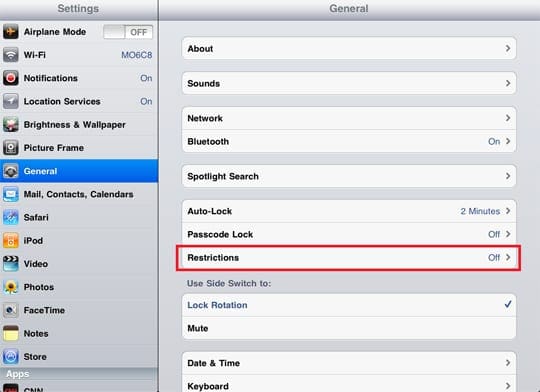
On the iPad there is a Settings icon, touch that and go there.
image via:  http://www.vpnfortress.com/setup/ipad-vpn-set-up.html 

Under General there is the heading Restrictions
image via:  http://appletoolbox.com/2011/12/how-to-setup-parental-controls-on-an-ipad/ 

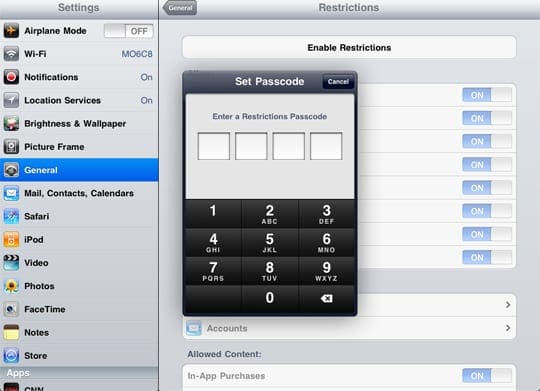
Touch it and Set Passcode, if you haven't already.
image via:  http://appletoolbox.com/2011/12/how-to-setup-parental-controls-on-an-ipad/  

After you have set the pass code go into Restrictions, enter the code and turn off all functions you don't want your child to have.
We turn off Safari (the Internet), YouTube, Downloading Apps, Deleting Apps and In-App Purchases.
Once you have set those, and exited settings, you can give it to your child and feel pretty safe they are not going to see anything untoward or run up your iTunes bill.
image via:  http://ipod.about.com/od/ipadhowtos/ss/buying-at-ibooks-store_4.htm 

Your iTunes also has a password, make sure to keep BOTH the iTunes password and the Restrictions codes secret from your children. I haven't had to change the iTunes code yet. If they happen to crack your code on the iPad, you will have to go in and change it. You can do that by going back into Restrictions and hitting Disable Restrictions. Then hit the same bar again, only this time it will say Enable Restrictions, put in the new Passcode, go back and turn off the options you don't want.
image via:  http://www.worldstart.com/ipad-restrictions/
We have had to change the restrictions codes on both their iPads since they cracked the codes. I now make them leave the room when I am entering codes, so they can't see me entering them. I have also had to make the Restrictions Passcode an obscure one, rather than one of the ones we commonly use for other things, like Netflix or Lego.com or individual user passwords.
image via:  http://www.sott.net/articles/show/244744-Parents-Sue-Apple-Over-Children-s-Costly-and-Highly-Addictive-Apps
We also have some rules around iPad use. They are only allowed to use it when they have earned it with good behavior. With Sensi it is a potty prize of sorts. She has to go number two at least once every 24-36 hours or she loses her iPad privileges. If she has no reward, she will just hold it for days. She also will get involved in the iPad or Netflix and forget to go when she needs to. iPad use as a reward is motivating for her to even try to go. This works for us.
Random Guy can use his after he has finished his homework and has had appropriate behavior. He is now ten and getting very sassy. The possibility of not getting to use his iPad has kept some of that behavior in check.
 Also there are no iPads an hour before sleep time. They can use it to wind down in the evening, but I take it from them an hour before sleep time. There is some evidence that iPad use interferes with sleep.
image via:  http://abcnews.go.com/blogs/technology/2012/04/parents-sue-apple-for-in-app-and-in-game-purchases-made-by-kids/
We take iPads and recharge them in our bedroom at night, so we know where the iPads are and can shut down any programs running in the background.
Apps and in-app purchases are also doled out for good behavior. If Sensi wants a book off her MeeGenius app or Random Guy from his Doctor Who comics platform they have to ask for it and good behavior has to have been followed for that day. Random Guy is also working toward a Minecraft app by getting ready for school in the morning without delay or complaining. We are on week three of trying to earn this app.
Be careful about what apps you load on your child's device. Since you are in control of the app purchases, even free ones, (since you have the iTunes code,) don't let them have any old app they choose. Look at what others have said about the apps you are about to purchase. CommonSenseMedia.org is a good site, there are many others that rate and review apps.
image via:  http://uk.androlib.com/android.screenshot.app.tBiDF-AiqDE.u.aspx 
If there is an app that causes a problem, (like Talking Ben,) you can delete it. It will stay in your iTunes library if you ever want it back, but it doesn't have to stay on your kid's iPad if it is causing trouble.
So there you have the Savvy Advocate Mom iPad basic rules and regulations. Happy e-play.

Sources:
appletoolbox.com/how-to-setup-parental-controls-on-an-ipad
http://www.worldstart.com/ipad-restrictions/
http://www.lrc.rpi.edu/resources/newsroom/pr_story.asp?id=235

Friday, July 20, 2012

Speech Therapy- The Lastest Recommended apps for Categories

Our Ms. Speech recommended several apps for SensiGirl to work on her categories and sorting, generalization and abstract thinking. She praised Kindergarten.com and Grasshopper apps for having really good basic apps. She said that just to look at the names they seem really boring, but they do their jobs very well.
image via:
http://itunes.apple.com/us/app/clean-up-category-sorting/id404057271?mt=8
 
Clean Up: Category Sorting - Free, play a clean up game while sorting catigories.
http://itunes.apple.com/us/app/clean-up-category-sorting


image via:  http://itunes.apple.com/us/app/things-that-go-together/id490647359?l=es&mt=8 
Things That Go Together: Free, a match up game.
http://itunes.apple.com/us/app/things-that-go-together


image via:  http://techinspecialed.com/appy/app_details.php?id=506997421 
Comparative Adjectives: Free, compare bigger, heavier, youngest. These are tricky when you first learn the language.
http://itunes.apple.com/us/app/comparative-adjectives


image via:  http://itunes.apple.com/us/app/aba-problem-solving-game-which/id357097338?mt=8 


What Does Not Belong: Free, pick the odd one out.
http://itunes.apple.com/us/app/what-does-not-belong


Here are several My First Apps. They are free for the first two boards,  then you pay 99 cents for the next bunch of boards (up to 12). Some have up to three levels of the same type of app, so there is Families 1 and Families 2, etc.

image via:  http://itunes.apple.com/us/app/sort-it-out-2/id501952788?mt=8 

Sort It Out 1: Free for first two boards, a My First App. This is a favorite once we got all the boards.
http://itunes.apple.com/us/app/sort-it-out-1


image via:  http://itunes.apple.com/us/app/whats-diff-1/id500644706?mt=8 

What's Diff 1: Take the odd one out of the line up. Different levels are available.
http://itunes.apple.com/app/whats-diff-1


image via:  http://itunes.apple.com/us/app/match-it-up-3/id421842311?mt=8 
Match It Up 3, put the two images that match together.
http://itunes.apple.com/app/match-it-up-3


image via:  http://techinspecialed.com/appy/app_details.php?id=428839475 

Families 1: Put the one that belongs with the group in the box.
http://itunes.apple.com/app/families-1

These are our latest bunch we have been exploring. Please share if you have other apps that are helpful for your kids.


Friday, June 15, 2012

Auditory Processing Apps and More

Here are the latest apps I found in my quest for auditory processing apps for SensiGirl. All apps are the usual .99 to 4.99 unless otherwise noted.
image via:http://itunes.apple.com/us/app/ear-sharpener/id383672887?mt=8
Ear Sharpener: A relative pitch game.
http://itunes.apple.com/us/app/ear-sharpener


image via: http://itunes.apple.com/us/app/melody-match-lite/id302930348?mt=8
image via: http://a1.mzstatic.com/us/r1000/010/Purple/ab/1b/59/mzl.jbljldhi.320x480-75.jpg


Melody Match Lite and Sound Match :  Both iphone apps, Free, like the classic Memory game only with sounds.
http://itunes.apple.com/us/app/melody-match-lite
http://itunes.apple.com/us/app/sound-match


image via: http://itunes.apple.com/us/app/aba-receptive-identification/id346469566?mt=8
ABA Receptive Identification by Class: Fit the object into the catigory
http://itunes.apple.com/ca/app/aba-receptive-identification/id346469566?mt=8


image via: http://itunes.apple.com/us/app/aba-problem-solving-game-which/id357097338?mt=8
ABA Receptive Problem Solving - Which Go Together?: Figure out why the go together or why not.
http://itunes.apple.com/ca/app/aba-problem-solving-game


image via: http://education.appdownloadreview.com/online/splingos-language-universe
Splingo's Language Universe: For listening and language skills. Interact with the images on the screen.
http://itunes.apple.com/us/app/splingos-language-universe/id457526530?


image via: http://www.appolicious.com/education/apps/862523-language-lab-core-words-prentke-romich-company
Language Lab: Core Words: Free, find the word and fit right word into sentences.
http://itunes.apple.com/us/app/language-lab-core-words

image via: http://itunes.apple.com/us/app/language-lab-directing-activities/id527182200?mt=8
Language Lab: Directing Activities: 1.99  Find the words in sentences and fill in the blanks.
http://itunes.apple.com/us/app/language-lab-directing-activities


More Story Telling Apps:

image via: http://itunes.apple.com/us/app/youre-storyteller-surprise/id527236318?mt=8
You're the Storyteller:  Watch the wordless scene and record your own narration.
http://itunes.apple.com/us/app/id527223436?mt=8

image via: http://blogs.kqed.org/mindshift/feature/educational-apps/
Scribble Press: Free, Book creation platform, really great for story creation.
http://itunes.apple.com/us/app/scribble-press/id487300076?mt=8


resources:
http://shinobijimbo.blogspot.com/2012/06/favorite-occupational-therapy-apps.html

http://www.oneplaceforspecialneeds.com/main/library_special_needs_apps.html


Monday, May 21, 2012

iPad Apps for Preteens and Young Teens


Here are several apps for older kids and young teens.

Apps for media savvy and bullying:
There are quite a few Professor Garfield apps on topics such as online safety, cyberbullying, fact analysis and forms of media.  If your kid likes comic strips it is a good way to present the information. Here are two of them

image via: http://www.padvance.com/app/professor-garfield-cyberbullying

Professor Garfield, Fact or Opinion, for older kids to get the concept of opinion presented as fact
http://itunes.apple.com/au/app/professor-garfield-fact-or/id401257010?mt=8
Professor Garfield, Cyberbullying
http://itunes.apple.com/us/app/professor-garfield-cyberbullying

image via: http://a6.mzstatic.com/us/r1000/021/Purple/0b/d2/08/mzl.crcuvxjg.png
Bully Shield, provides research based solutions and concrete steps for the child being bullied.
http://itunes.apple.com/us/app/bully-shield/id363952291?mt=8

Apps for making math fun:
image via: http://itunes.apple.com/us/app/algebra-explained-c.-3-solve/id435399256?mt=8
Algebra Explained, several apps, there is a lite version available for free
.http://itunes.apple.com/us/app/algebra-explained-c.-1-order/id426007967?mt=8

image via: http://www.yofx.org/?cat=25
Symmetry Shuffle,  game for the detail oriented mind, encourages higher order thinking.
http://itunes.apple.com/us/app/symmetry-shuffle

An App for proper use of English phrases
image via: http://iphone.appstorm.net/reviews/lifestyle/test-your-word-wisdom-with-phrase-wit/
Phrase Wit, helps with tricky turns of phrase.
http://itunes.apple.com/us/app/phrase-wit

History apps:
image via: http://www.ipadappsbase.com/american-presidents-educative-ipad-app/
American Presidents for iPad, makes history visual for those visual learners.

http://itunes.apple.com/us/app/american-presidents-for-ipad/id453403499?mt=8


image via: http://a5.mzstatic.com/us/r1000/100/Purple/65/ec/d3/mzl.ijkmuwah.320x480-75.jpg

Video Time Machine, use your iPad to time travel to video clips, for older teens as there is some graphic content, such as found on YouTube or broadcast TV.
http://itunes.apple.com/us/app/video-time-machine

And here are a couple that are just for fun:
image via: http://www.addictivetips.com/mobile/vidrhythm-a-fun-way-of-creating-personalized-music-videos-on-iphone/


Vidrhythm, make your own video music
http://itunes.apple.com/us/app/vidrhythm

image via: http://brainfoggles.com/2010/07/06/style-studio-fashion-designer-iphone-app-review
Style Studio Fashion Designer,  make your own fashions. Check your restrictions so it doesn't connect to YouTube or email if that is your preference.
http://itunes.apple.com/us/app/style-studio-fashion-designer


resources:
iAppFind
http://www.iappfind.com
Common Sense Media
http://www.commonsensemedia.org/mobile-app-lists
Smart Apps for Kids
http://www.smartappsforkids.com/ages-12-up/